
Jobs Manager
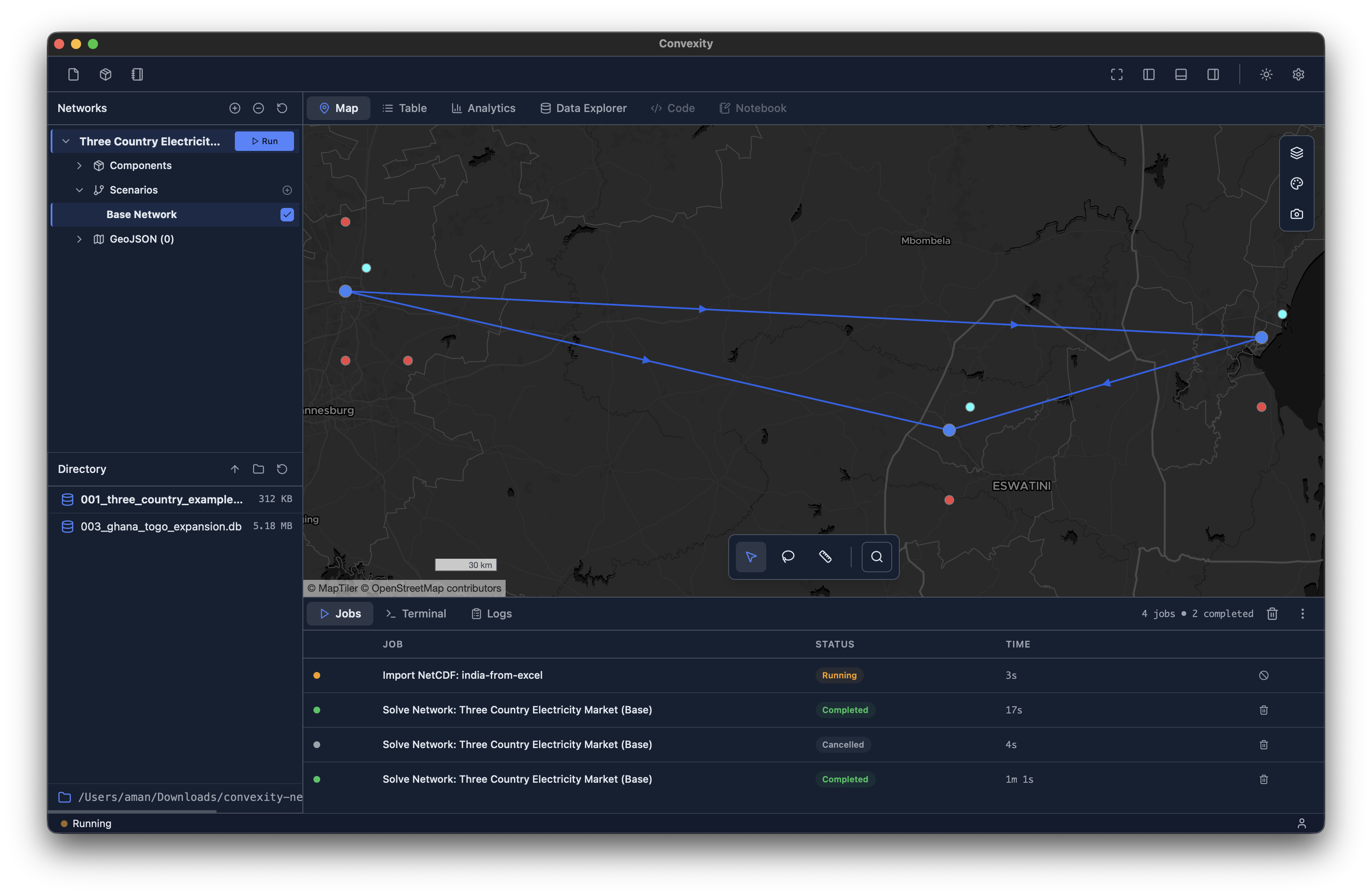
The utilities panel is located in the bottom section of the main interface (see image above). It can be shown or hidden using the bottom-panel button in the top-right of the toolbar.
Being able to track jobs is an essential part of energy systems modelling workflows. Users need to be able to check in on the progress of their model runs, see how long things are taking or have taken, but also cancel any runs for whatever reason. The jobs manager tab is built for this purpose.
It is a tabulated stucture showing:
Job name: Defined by the name of the model and the scenario. For example, in the example above, we see
Solve Network: Three Country Electricity Market (Base), where the first part corresponds to the function (Solve Network), the model's name (Three Country Electricity Market) and the scenario name in paranthesis (Base). We also see another type of job in the screenshot above, which relates to the netCDF import function.Status: This shows the current status of the job, where you will see either: Running, Completed, Failed or Cancelled.
Time: this shows the time the job is currently on or how long it took.
Actions icon: This is where you can cancel a job or delete its record from the table.